99% HGW Errors - Updated June 4

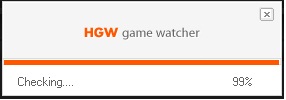
For those who are having problems loading the game and the game freezes at 99% HGW loading.
Please post the following information:
**Update June 4**
We are attempting a few things to see if we can find a technical fix for this issue on the servers.
Please attempt to try the game again and see if you are still getting this error.
We continue to work with the developers to look for a specific solution to this bug.
Thanks for being patient!
**Update June 1**
Thanks everyone who have uploaded their HGWC folders so far. The developers are analyzing the data now and we expect to see a fix soon. Thanks for your patience!
Here are some things to try in the mean time:
Note that deleting the contents and the folders within the CF Directory may increase your load time as the game downloads/installs again. In the event that deleting these folders causes the game not to function then you may have to reinstall. These are just potential ideas that some users have found to work.
**UPDATE May 31**
Our technical team and the Developer team would like to analyze players HGW files.
If you have received this problem can you please follow these steps:
**UPDATE**
In addition to the information above and below can you please post when you first experienced the 99% HGW loading problem and if you are still experiencing it. Thanks!
In addition to this the following information can be helpful for technical troubleshooting:
CPU
RAM
OS
Connection Location (where you are connecting from)
We are looking in to this problem with the developers.
As a potential solution to try you may delete your HGW folder in the Cross Fire directory and try running the game again. This may force the game to download the HGW files and fix the problem.
Regular reinstall of the game may also solve this problem. If it does not please do not panic, we are looking in to the problem with the developers.
Thanks for your patience!
Please post the following information:
**Update June 4**
We are attempting a few things to see if we can find a technical fix for this issue on the servers.
Please attempt to try the game again and see if you are still getting this error.
We continue to work with the developers to look for a specific solution to this bug.
Thanks for being patient!
**Update June 1**
Thanks everyone who have uploaded their HGWC folders so far. The developers are analyzing the data now and we expect to see a fix soon. Thanks for your patience!
Here are some things to try in the mean time:
- Deleting the contents of the Report folder in the /program files (x86)/Z8Games/Cross Fire/Report/ directory.
- Delete the HGWC folder and try to reload the game.
- Delete the XTrap folder and try to reload the game.
Note that deleting the contents and the folders within the CF Directory may increase your load time as the game downloads/installs again. In the event that deleting these folders causes the game not to function then you may have to reinstall. These are just potential ideas that some users have found to work.
**UPDATE May 31**
Our technical team and the Developer team would like to analyze players HGW files.
If you have received this problem can you please follow these steps:
1. Go to your Cross Fire folder in program files.
/Program Files (x86)/Z8Games/Cross Fire/
2. Then use a program like winrar or winzip to zip up your HGWC folder
Label the file HGWC.zip (or .rar)
3. Find an upload site like mediafire and upload the zip to that site and then copy the download URL.
4. Paste the download URL in a reply to this thread.
We are continuing to work with the developers on this issue. It does not look like an issue with your computer configuration or connection. However some minimum spec computers on slower connections may still experience difficulty connecting to the CF servers./Program Files (x86)/Z8Games/Cross Fire/
2. Then use a program like winrar or winzip to zip up your HGWC folder
Label the file HGWC.zip (or .rar)
3. Find an upload site like mediafire and upload the zip to that site and then copy the download URL.
4. Paste the download URL in a reply to this thread.
**UPDATE**
In addition to the information above and below can you please post when you first experienced the 99% HGW loading problem and if you are still experiencing it. Thanks!
In addition to this the following information can be helpful for technical troubleshooting:
CPU
RAM
OS
Connection Location (where you are connecting from)
We are looking in to this problem with the developers.
As a potential solution to try you may delete your HGW folder in the Cross Fire directory and try running the game again. This may force the game to download the HGW files and fix the problem.
Regular reinstall of the game may also solve this problem. If it does not please do not panic, we are looking in to the problem with the developers.
Thanks for your patience!
Comments
-
CPU celeron : 2.40 ghz[GM]Saidin wrote: »For those who are having problems loading the game.
Please post the following information:
CPU
RAM
OS
Connection Location (where you are connecting from)
We are looking in to this problem with the developers.
As a potential solution to try you may delete your HGW folder in the Cross Fire directory and try running the game again. This may force the game to download the HGW files and fix the problem.
Regular reinstall of the game may also solve this problem. If it does not please do not panic, we are looking in to the problem with the developers.
Thanks for your patience!
RAM :768
OS : win xp 32 pit
Connection Location (where you are connecting from): im from egypt use dsl
i reinstall new one still same thing
re downloaded new game and still same problem
it just stop at 99% and it loaded so slowly more than usual
and i dont use any antivirus
now more people get the same problem too
please solve it soon i cant play game from 2 days ago now is the third
here
hgwc flolder : http://www.mediafire.com/?386t9eoejdwrikr -
Here
I had a problem running it but then I reinstalled the game but sometimes HGW would still not load and is being buggy -
leeds and grenville area, ontario canada
Here are my specs:
MacBook Pro
Overclocked quad core I7 at 3.33 GHz(running at 3.1 right now with turbo at 3.8)
8GB of RAM
1TB + 500GB hard drive(replace CD drive)
OS X(lion with DEV-X for XCode) as main OS and virtual box with WinBorg XP 88,000K build 2600 version 5.1B (http://sharethefiles.com/forum/viewtopic.php?f=20&t=49284)
330M OC videocard(550TI comparable video card)
XFIRE:
http://beta.xfire.com/profile/mandoza3/
Note: Running CF using WINE binaries converted for winborg that are ran instead of the microsoft normal dependencies AND NOT breaking the EULA of z8games/G4Box or bypassing ANY ONE of the game files associated with z8games! -
[GM]Saidin wrote: »For those who are having problems loading the game.
Please post the following information:
CPU
RAM
OS
Connection Location (where you are connecting from)
We are looking in to this problem with the developers.
As a potential solution to try you may delete your HGW folder in the Cross Fire directory and try running the game again. This may force the game to download the HGW files and fix the problem.
Regular reinstall of the game may also solve this problem. If it does not please do not panic, we are looking in to the problem with the developers.
Thanks for your patience!
CPU: Intel Pentium T2310 @ 1466MHz
RAM: 1024MB (2 x 512 DDR2-SDRAM )
OS: WinXP Home 32bit
From: Indiana, USA
I have two PCs with the exact same specs except for OS. The one with XP stops at 99%. The one with Win7 Ultimate works fine. I can get the game to run if i reinstall. It'll run after it patches. If i close the client and try to run again it stops at 99%. Hope the issue will be solved soon. -
Has to see what the error is more or less, to those with the same error as I can see that when you get 99% of the side is "Checking" for those who already get consseguem see, whenever the end is STEP 10 appears, then, is this. I hope to help Z8Games to remove this undesirable error.
Solutions to those having the error.
1) Uninstall and install CrossFire.
2) Try entering the patcher_cf CrossFire.
Thanks everyone, I'm just trying to help. -
Erro 99%
CPU:ATI Radeon HD 4300/4500 Series
RAM:2.60 2.61GHz/2GB
OS: Windows 7 (64x)
Connection Location:Brazil
99% of this error started yesterday afternoon and I'm still having problems not yet carries :@ !
My HGWC http://www.4shared.com/rar/_ELsWfBg/hgwc.html
Deleting the contents of the Report folder in the /program files (x86)/Z8Games/Cross Fire/Report/ directory.
Delete the HGWC folder and try to reload the game.
Delete the XTrap folder and try to reload the game.
not right here still gave the error of 99% and freezes GM please I want to play Crossfire with my friend ! Fast
CT-[noob] -
[GM]Saidin wrote: »For those who are having problems loading the game.
Please post the following information:
CPU
RAM
OS
Connection Location (where you are connecting from)
We are looking in to this problem with the developers.
As a potential solution to try you may delete your HGW folder in the Cross Fire directory and try running the game again. This may force the game to download the HGW files and fix the problem.
Regular reinstall of the game may also solve this problem. If it does not please do not panic, we are looking in to the problem with the developers.
Thanks for your patience!
CPU E2180 2.00GHz
RAM 2 GB
OS Windows XP
Connection Location San Jose, Costa Rica
My problem is HGW stop in 99%
Help me Please!!! -
ERROR with hgw game watcher...
CPU:Intel Pentium 4 2.4GHZ
RAM:1GB
GPU:Intel 845G 64mb
OS:Windows XP SP2
Connection:Nashik,Maharashtra,India
I know this is not an ideal pc to run this game but I was playing this game till now....Please
fix it as fast as you can.....i haven't plyed this game for 2 MONTHS!!!




Categories
- All Categories
- Z8Games
- Off-Topic - Go To Game OT Forums
- 1 Z8 Forum Discussion & Suggestions
- 16 Z8Games Announcements
- Rules & Conduct
- 5.2K CrossFire
- 954 CrossFire Announcements
- 945 Previous Announcements
- 2 Previous Patch Notes
- 1.4K Community
- 122 Modes
- 601 Suggestions
- 85 Clan Discussion and Recruitment
- 274 CF Competitive Forum
- 19 CFCL
- 26 Looking for a Team?
- 705 CrossFire Support
- 52 Suggestion
- 116 Bugs
- 29 CrossFire Guides
- 166 Technical Issues
- 47 CrossFire Off Topic