Invalid Item Information

I have a problem with logging in.
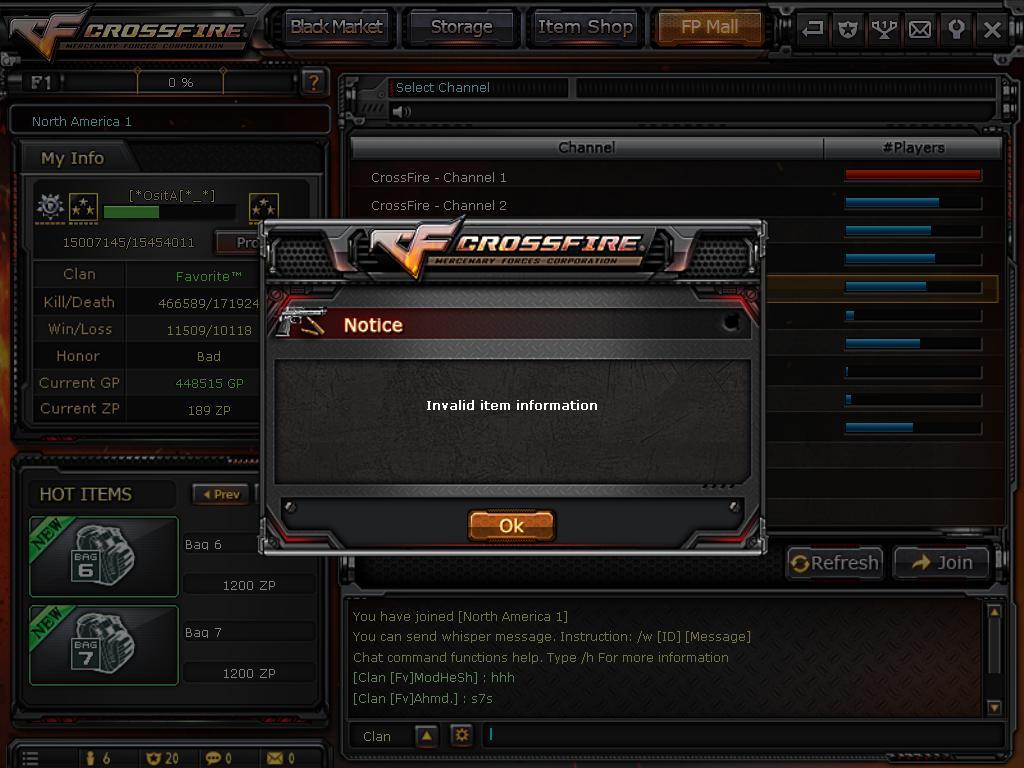
nickname and password are correct, but when i want to choose serwer (eg. uk4) there is a information "invalid item information" and i got disconnect. what should i do with that? I had the same problem in June 2015, they fix it after 2 weeks and now its the same story, the same things since 3 days, cant play CF
Its looks like that:
In june 2015
http://zapodaj.net/24e6ffead7d8d.bmp.html
http://zapodaj.net/579bdf82c6643.bmp.html
Now:
http://zapodaj.net/f5c1aa423dbf7.bmp.html
My brother logged on into his account from my computer and everything is correct, only my account shows this error. I tried to log in on another PC and it was the same - Invalid Item Information. Please help me as fast as you can i want to finish an event, daily missions
Z8Support send me this:
ARE THEY JOKING? I told them my brothers acc is working on my pc... so it's not my fault but their!
nickname and password are correct, but when i want to choose serwer (eg. uk4) there is a information "invalid item information" and i got disconnect. what should i do with that? I had the same problem in June 2015, they fix it after 2 weeks and now its the same story, the same things since 3 days, cant play CF
Its looks like that:
In june 2015
http://zapodaj.net/24e6ffead7d8d.bmp.html
http://zapodaj.net/579bdf82c6643.bmp.html
Now:
http://zapodaj.net/f5c1aa423dbf7.bmp.html
My brother logged on into his account from my computer and everything is correct, only my account shows this error. I tried to log in on another PC and it was the same - Invalid Item Information. Please help me as fast as you can i want to finish an event, daily missions
Z8Support send me this:
Hello,
Thank you for contacting Z8Games Support Center.
All of our systems are currently running normally and most of the users are able to play normally. If you are still facing issues, please try the following steps for basic troubleshooting:
- Check if your computer currently meets our minimum system requirements at http://crossfire.z8games.com/support_start_game_sys_req.aspx
- Restart your computer and trying again. Occasionally, anomalies may occur the longer a system has been up and running. If the problem is fixed after a restart, this may explain the situation you are experiencing.
- Check your DirectX version and the date on key system drivers such as your network card and graphics card to ensure that everything is up to date.
- Check any hardware or software that interacts with your internet connection between your computer and your Internet Service Provider (ISP). Routers, firewalls, anti-virus software and the like can occasionally interfere with your connection to CrossFire. You should provide or make "exceptions" (put CrossFire in the list of safe programs) so that the game can pass through any security settings you may have enabled.
- Scan your computer for any viruses and spyware's, and remove them. Viruses or spyware may also cause issues for the game.
- Close down any applications which may be running prior to launching CrossFire as these may interfere with the running of the game.
If you have any serious difficulties loading the game, we recommend you uninstall the game using the official uninstaller located on your start menu (http://crossfire.z8games.com/support_how_to_Uninstall.aspx).
Then please go to the main Crossfire website and download our newest client version on the download option page: http://crossfire.z8games.com/downloads2.aspx
Here is a complete guide on how to install CrossFire: http://crossfire.z8games.com/support_start_game_how_to_install.aspx
Please re-install the game and try again.
You may also wish to try posting your issue on our Technical Issues Forum (http://forum.z8games.com/forumdisplay.php?f=13). Some players may have the same issue you are experiencing and the player community may be able to assist with your specific issue further there, but please keep in mind that all advice offered on that forum is given "as-is" and is not necessarily endorsed or recommended by SG Entertainment/Smilegate West.
We thank you for your patience and understanding, and we apologize for any inconvenience this may have caused you.
Regards,
Z8Games Support
www.z8games.com/termsandcondition.html
ARE THEY JOKING? I told them my brothers acc is working on my pc... so it's not my fault but their!
Comments
-
This is a very strange error indeed. My only suggestion would be to re-install the game however, you said you already tried logging in another computer. I guess it would hurt if you still tried to re-install eh?
- Control Panel -> Z8Games -> CrossFire -> Uninstall CrossFire
- Open Up My Computer
- Delete the CF directory (Program Files/Z8Games/CrossFire/)
- Delete the CF directory (<user>/Document/CrossFire/) (Make sure you backup any screenshots or replays you may have before doing this).
- Disable your anti virus
- Download the newest client from our downloads site
- Install the game from the new download
- Add the entire crossfire folder to your antivirus exceptions
- Re-enable realtime protection
Let me know how things go...
-
-
Chaveztifany wrote: »I have the problem still no solution
Gm not give me the answer to the question
invalid item information
Send in a support ticket. I don't anyone on the forums can assist you anymore with this problem. Hopefully, Support can give you a solution. -




 [/url]


Categories
- All Categories
- Z8Games
- Off-Topic - Go To Game OT Forums
- 1 Z8 Forum Discussion & Suggestions
- 16 Z8Games Announcements
- Rules & Conduct
- 5.5K CrossFire
- 1.1K CrossFire Announcements
- 1.1K Previous Announcements
- 2 Previous Patch Notes
- 1.4K Community
- 124 Modes
- 638 Suggestions
- 86 Clan Discussion and Recruitment
- 277 CF Competitive Forum
- 19 CFCL
- 26 Looking for a Team?
- 753 CrossFire Support
- 64 Suggestion
- 124 Bugs
- 30 CrossFire Guides
- 176 Technical Issues
- 49 CrossFire Off Topic