See Time InGame?

Comments
-
[MOD]D34d3y3 wrote: »That's the in game timer to show you how long the match has left. You can't get it to show real life time. If it was showing the same time as it was IRL, it was coincidence.
omg u guys dont understand me..
i want to add rl time under game time got it?? -
You could add a /time command to show RL time and/or server time (eastern time) then they can just calculate how many hours they are from eastern time zone. But Warcraft 3 has a /time command and it shows your current time and the servers current time.
This would probably have to be added by devs and have a long request time. probly not worth it. -
Xfire adds FPS (top left) and Time (top right) to your screen (at least last time I used it, don't use it much) but I couldn't move it around like other games. So if you want to see the time you can try that and with Xfire you can make videos (it can lag you very much) and screenshots that you can upload to your Xfire profile, keep record of playtime and chat with people you add (text and voice).
-
Xfire adds FPS (top left) and Time (top right) to your screen (at least last time I used it, don't use it much) but I couldn't move it around like other games. So if you want to see the time you can try that and with Xfire you can make videos (it can lag you very much) and screenshots that you can upload to your Xfire profile, keep record of playtime and chat with people you add (text and voice).
I'm glad someone picked up what it is. Chances are you show this is one of my videos, as that's where I've had the time overlay from Xfire shown.
You can see it in this video. http://www.xfire.com/video/b828e/
However since some while ago a CF update broke the mouse working with Xfire ingame, so you can't change if the time overlay is shown or where it is. You may be able to change it with the Xfire INI files. I'll fool around with them and get back to you. -
GUYS, You had Xfire running, that is the Real world time, and also your Frames Per Second (FPS) is displayed, For anyone who wants this feature, Download Xfire then minimize it to the background, You may have to play with the settings to get the screen to display that additional information bar with the Time, Its not too hard though, Hope it helpedLike this? i got this ONCE i dunno if i had something running or anything but i just appeared once n ive never got it since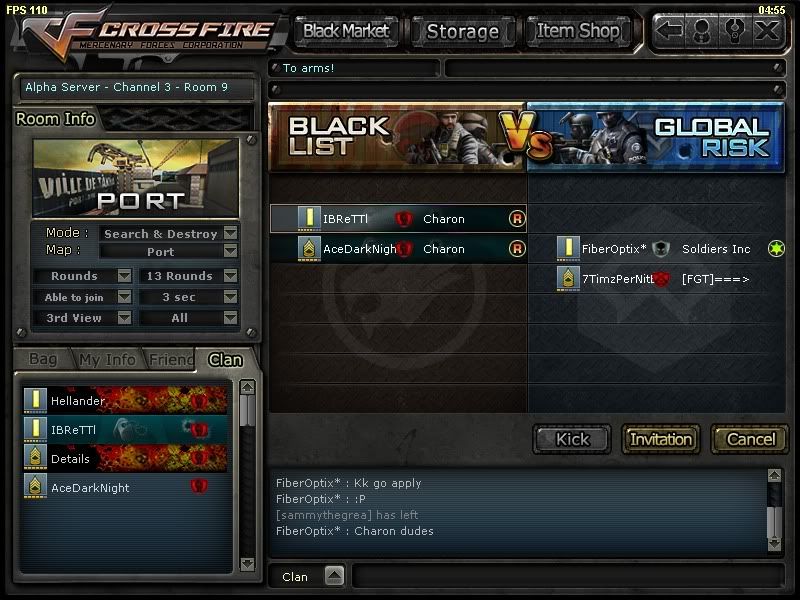


 HERE IT IS

![[MOD]D34d3y3](https://forum.z8games.com/uploads/customavatars/81/navatar_1336081.gif)


![[MOD]BlindRob](https://z8games.akamaized.net/cfna/forum/customavatars/74/navatar_3048474.gif)

Categories
- All Categories
- Z8Games
- Off-Topic - Go To Game OT Forums
- 1 Z8 Forum Discussion & Suggestions
- 16 Z8Games Announcements
- Rules & Conduct
- 5.5K CrossFire
- 1.1K CrossFire Announcements
- 1.1K Previous Announcements
- 2 Previous Patch Notes
- 1.4K Community
- 124 Modes
- 643 Suggestions
- 86 Clan Discussion and Recruitment
- 277 CF Competitive Forum
- 19 CFCL
- 26 Looking for a Team?
- 758 CrossFire Support
- 64 Suggestion
- 125 Bugs
- 30 CrossFire Guides
- 178 Technical Issues
- 49 CrossFire Off Topic