XTrap Troubleshooting

XTrap errors have always been a common problem for the Crossfire
community. Since the community in this Technical Support section is
so great, I thought I'd fix us up an XTrap Troubleshooting thread
that we can refer to when helping others fix common errors. If you
know of an XTrap error that isn't listed, and know a solution for it,
please post the solution by all means, you'll be credited!
Table of Contents
1. Codefield 10-0300-00002EFD-146
2. Codefield 02-0300-00000424-502
3. Codefield 08-0400-00000000-509
4. Codefield 10-0300-00002EE7-200
1. Codefield 10-0300-00002EFD-146
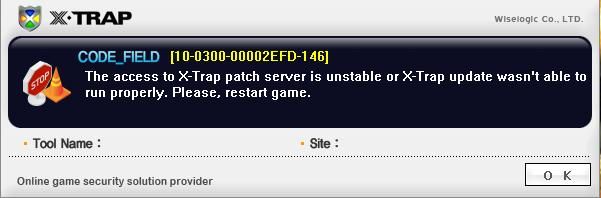
XTrap is unable to access the patch servers. This happens because
your anti-virus program is blocking XTrap from accessing the internet.
Turn off your anti-virus, or add XTrap to the exceptions list.
2. Codefield 02-0300-00000424-502
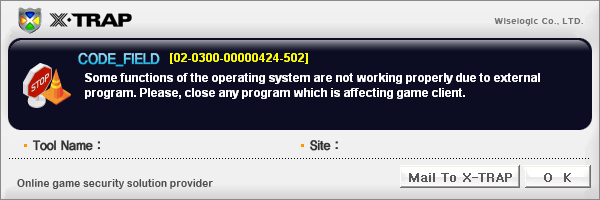
This error message is caused by your anti-virus, or the fact that you're
not running HGWC.exe is an administrator.
1. Go to this directory: C:/Program Files/Z8Games/Crossfire
2. Right click HGWC, Click 'Properties', Click 'Compatability', then click
'Run this program as admin'.
3. Do the same thing (step 2) for G4_box.exe and cf_patcher.exe.
If you believe it may be your anti-virus, add the whole Crossfire folder
(located at C:/Program Files/Z8Games/Crossfire) to the exceptions
list on your anti-virus.
3. Codefield 08-0400-00000000-509
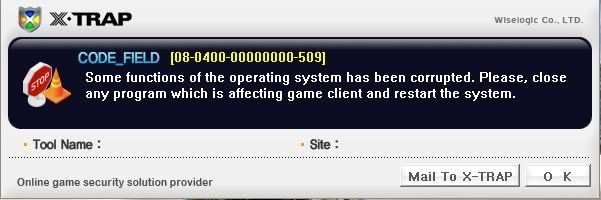
This error is generally caused by overlays, such as FPS counters, Steam,
game recorders, Skype, XFire, etc. Turn off all of your programs that use
overlays.
4. Codefield 10-0300-00002EE7-200
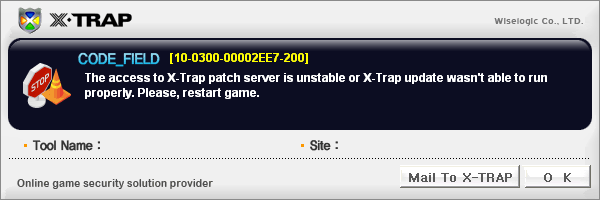
XTrap is unable to access the patch servers. This happens because
your anti-virus program is blocking XTrap from accessing the internet.
Turn off your anti-virus, or add XTrap to the exceptions list.
(more to come with community support!)
community. Since the community in this Technical Support section is
so great, I thought I'd fix us up an XTrap Troubleshooting thread
that we can refer to when helping others fix common errors. If you
know of an XTrap error that isn't listed, and know a solution for it,
please post the solution by all means, you'll be credited!
Table of Contents
1. Codefield 10-0300-00002EFD-146
2. Codefield 02-0300-00000424-502
3. Codefield 08-0400-00000000-509
4. Codefield 10-0300-00002EE7-200
1. Codefield 10-0300-00002EFD-146
XTrap is unable to access the patch servers. This happens because
your anti-virus program is blocking XTrap from accessing the internet.
Turn off your anti-virus, or add XTrap to the exceptions list.
2. Codefield 02-0300-00000424-502
This error message is caused by your anti-virus, or the fact that you're
not running HGWC.exe is an administrator.
1. Go to this directory: C:/Program Files/Z8Games/Crossfire
2. Right click HGWC, Click 'Properties', Click 'Compatability', then click
'Run this program as admin'.
3. Do the same thing (step 2) for G4_box.exe and cf_patcher.exe.
If you believe it may be your anti-virus, add the whole Crossfire folder
(located at C:/Program Files/Z8Games/Crossfire) to the exceptions
list on your anti-virus.
3. Codefield 08-0400-00000000-509
This error is generally caused by overlays, such as FPS counters, Steam,
game recorders, Skype, XFire, etc. Turn off all of your programs that use
overlays.
4. Codefield 10-0300-00002EE7-200
XTrap is unable to access the patch servers. This happens because
your anti-virus program is blocking XTrap from accessing the internet.
Turn off your anti-virus, or add XTrap to the exceptions list.
(more to come with community support!)
Comments


Categories
- All Categories
- Z8Games
- Off-Topic - Go To Game OT Forums
- 1 Z8 Forum Discussion & Suggestions
- 16 Z8Games Announcements
- Rules & Conduct
- 5.4K CrossFire
- 1K CrossFire Announcements
- 1K Previous Announcements
- 2 Previous Patch Notes
- 1.4K Community
- 121 Modes
- 620 Suggestions
- 86 Clan Discussion and Recruitment
- 276 CF Competitive Forum
- 19 CFCL
- 26 Looking for a Team?
- 739 CrossFire Support
- 61 Suggestion
- 124 Bugs
- 29 CrossFire Guides
- 174 Technical Issues
- 47 CrossFire Off Topic