Screen not FIT. No Scaling Option!

When I was in the tutorial, the game resolution did not stretch to full screen. There was 2 black bars at the top and bottom. I wanted to stretch the resolution because I'm getting fps drop in my current DESKTOP resolution which is 1600x900 and I wanted to stay in 1280x768. So I searched for a solution and I found that it can be fixed through AMD Vision Engine Control Center by changing "Scaling Options".
But unfortunately, I couldn't find the scaling option which is suppose to be under "My Digital Flat-Panels". There was no "My Digital Flat-Panels" on my CCC option.
Here is my AMD Vision Engine Control Center Screenshot:
http://s958.photobucket.com/albums/ae65/kevzz010/?action=view¤t=Untitled.png
Can anyone help me? Any help would be greatly appreciated!
But unfortunately, I couldn't find the scaling option which is suppose to be under "My Digital Flat-Panels". There was no "My Digital Flat-Panels" on my CCC option.
Here is my AMD Vision Engine Control Center Screenshot:
http://s958.photobucket.com/albums/ae65/kevzz010/?action=view¤t=Untitled.png
Can anyone help me? Any help would be greatly appreciated!
Comments
-
Before you look at the screenshot, let me talk a bit.

Have you tried looking at every option/tab on the left hand column?
Okay... This is what I'm able to find with a search through our forums. I wonder if you can apply it to your situation.
ATI (Based on HD Radeon 4870)
Right click the desktop and choose Catalyst Control Center.
Look for Digital Panel > Attributes.
Under Image Scaling, select Scale image to full panel size, click apply/OK.
-
ATI (Based on HD Radeon 4870)
Right click the desktop and choose Catalyst Control Center.
Look for Digital Panel > Attributes.
Under Image Scaling, select Scale image to full panel size, click apply/OK.
It seems like you did not read my post nor you did look at my screenshot. Please do that.
Edit: Yes I've done looking all the tabs and can't seem to find scaling option. It should be under "Digital Flat-Panels" but as you can see, i don't have that tab. By the way, mine is AMD Vision Engine Control Center, I wonder if its different from CCC but i doubt it. -
It seems like you did not read my post nor you did look at my screenshot. Please do that.
reread my post as I edited it.
And what I'm showing is a different program that you may have not used?
I'm not much of a AMD person. I'm doing the best I can to help you with your issue. -
reread my post as I edited it.
And what I'm showing is a different program that you may have not used?
I'm not much of a AMD person. I'm doing the best I can to help you with your issue.
Sorry for my rudeness. I was really ****ed off of this problem and thanks for helping me. I had this problem in some games as well. I don't know if there's a difference between CCC and Vision Engline CC. -
Well one question would be if you even have CCC on your computer?Sorry for my rudeness. I was really ****ed off of this problem and thanks for helping me. I had this problem in some games as well. I don't know if there's a difference between CCC and Vision Engline CC.
Edit: Yes I've done looking all the tabs and can't seem to find scaling option. It should be under "Digital Flat-Panels" but as you can see, i don't have that tab. By the way, mine is AMD Vision Engine Control Center, I wonder if its different from CCC but i doubt it.
Could you post another screenshot of all the tab windows? (Like, you click on My VGA Displays then post the screenshot of whatever is shown on the right hand side)
And for posting pictures you can use the tags:
[noparse][/noparse] to show your image.
There should be an option in photobucket to already copy a link with the IMG tags in place.
Or you can use http://imgur.com or http://tinypic.com/
*note that you may need to resize on tinypic, if that's the case use the 15 in. option, or 800 X 600. -
Well one question would be if you even have CCC on your computer?
Could you post another screenshot of all the tab windows? (Like, you click on My VGA Displays then post the screenshot of whatever is shown on the right hand side)
And for posting pictures you can use the tags:
[noparse]
There should be an option in photobucket to already copy a link with the IMG tags in place.
Or you can use http://imgur.com or http://tinypic.com/
*note that you may need to resize on tinypic, if that's the case use the 15 in. option, or 800 X 600.
Here it is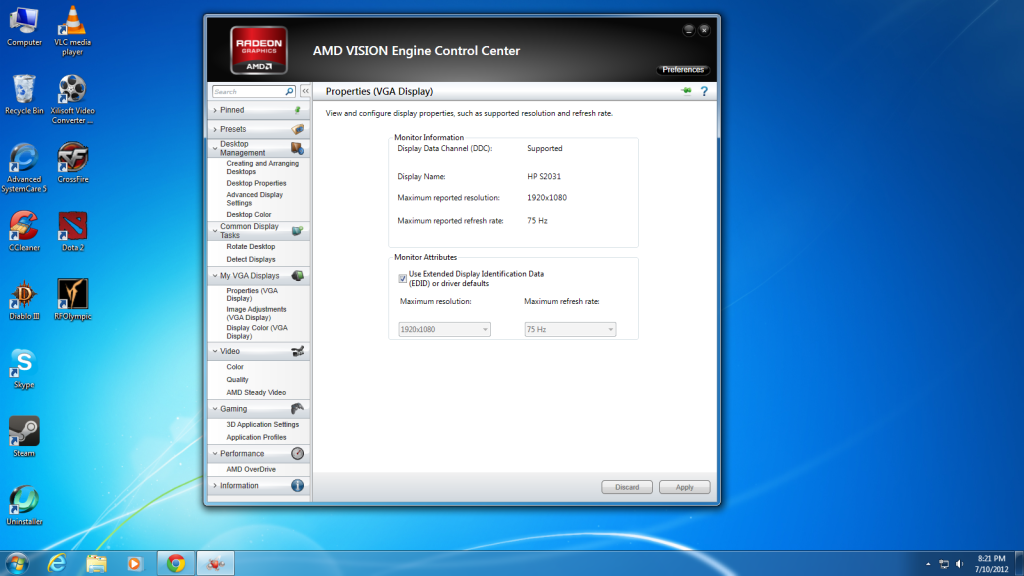
I believe that there isn't a difference between CCC and AMD Vision Engine Control Center. They said that CCC was for older gen ATI Gpu and AVECC is for newer gen GPU. -
You said you got this "So I searched for a solution and I found that it can be fixed through AMD Vision Engine Control Center by changing "Scaling Options". "
Can I see the link of the search result?
Ugh. I just fixed it using a third party program recommended by ATI.
I just download and run the file and checked "Scale image to full panel size".
Here's the link for the software just in case ATI users couldn't find a fix:
http://www.xgamingstudio.com/forum/showthread.php?122-RELEASE-ATI-GPU-Scaling-Fix-for-Windows-7
Thanks for trying to help me and I really appreciated it. And, sorry for my rudeness earlier.


Categories
- All Categories
- Z8Games
- Off-Topic - Go To Game OT Forums
- 1 Z8 Forum Discussion & Suggestions
- 16 Z8Games Announcements
- Rules & Conduct
- 5.4K CrossFire
- 1K CrossFire Announcements
- 1K Previous Announcements
- 2 Previous Patch Notes
- 1.4K Community
- 121 Modes
- 620 Suggestions
- 86 Clan Discussion and Recruitment
- 276 CF Competitive Forum
- 19 CFCL
- 26 Looking for a Team?
- 739 CrossFire Support
- 61 Suggestion
- 124 Bugs
- 29 CrossFire Guides
- 174 Technical Issues
- 47 CrossFire Off Topic