CF Freeze

I noticed there was a new xtrap update on May 10th.
After the update, i went in game, joined a room, hit start, and the loading screen supposed to pop up, but it just black and freezed.
I opened task manager and it said CF is not responding. This had happened for more than an hour, and I still failed after 20 times of trying.
Any advice would be appreciated.
After the update, i went in game, joined a room, hit start, and the loading screen supposed to pop up, but it just black and freezed.
I opened task manager and it said CF is not responding. This had happened for more than an hour, and I still failed after 20 times of trying.
Any advice would be appreciated.
Comments
-
have you figure it out yet?Yeah, I was thrilled to see the update. Not so thrilled to find out it made the game unplayable. Usually it's the game updates that do that, so this is a novel experience for me.
it's been the 2nd day for me, i've reinstalled and everything, same problem occurred.Try it again. It did the same thing for me, I just waiting and tryed again and it works fine now. GL
how many times did you try btw? -
Try doing a system restore, since this seems to be a recent problem with your Crossfire.
Start > Search > System Restore
(everything from the point of the restore until now will be deleted, including any saved progress and applications)
That is my answer for now, if that doesn't work, then I'll look for another solution. -
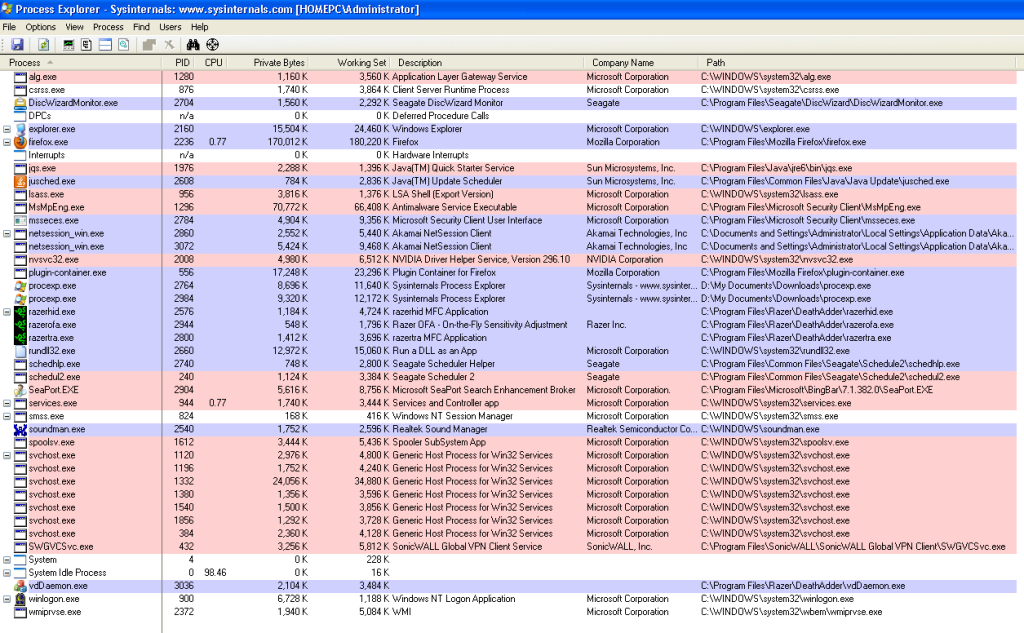
The only things that I know happened were some Windows updates for .NET, X-Trap, and a couple .package files for the Sims 3 that cannot run unless Sims 3 is running. I'm tempted to uninstall the .NET files and see if CF runs. Perhaps tomorrow. I've got my process list here. Nothing unusual. I tend to end the processes I don't need, like Java and the Sonicwall VPN (which is not active until I supply credentials), when I go in game. Now if I go in game and run task manager, the game will stop responding. It shows 0 CPU being given to it as well. If I don't leave the game and try to enter any server room like the shooting gallery or a real match, it runs the lead in screen then brings up a black window that takes up about a third of the screen. Then it just stalls there. It is fairly annoying.Try doing a system restore, since this seems to be a recent problem with your Crossfire.
Start > Search > System Restore
(everything from the point of the restore until now will be deleted, including any saved progress and applications)
That is my answer for now, if that doesn't work, then I'll look for another solution. -
Try doing a system restore, since this seems to be a recent problem with your Crossfire.
Start > Search > System Restore
(everything from the point of the restore until now will be deleted, including any saved progress and applications)
That is my answer for now, if that doesn't work, then I'll look for another solution.
I've tried your solution, even reinstalled CF, but it still happened.
This problem never happened before, until that xtrap update. -
The XTrap update never actually fixed anything, one of the things that happened was an update to it's detection file to detect new hacking programs/anti-viruses(sadly are included) and a program on your computer has now become added to that list.
You have to find out that program and delete it.
What I always ask for is the following:
Go to Control Panel, Click on Programs and Features, screenshot all programs on that list and post them up. -
WinBack466 wrote: »The XTrap update never actually fixed anything, one of the things that happened was an update to it's detection file to detect new hacking programs/anti-viruses(sadly are included) and a program on your computer has now become added to that list.
You have to find out that program and delete it.
What I always ask for is the following:
Go to Control Panel, Click on Programs and Features, screenshot all programs on that list and post them up.
I have This Error Plz Help Me This Is My screenshot Of My program
http://i50.tinypic.com/2mgwj2p.jpg -
I have This Error Plz Help Me This Is My screenshot Of My program
The only thing that I see on your computer that may interfer is Avast. Make sure that is disabled. Was it disabled during downloading the download file for CF, during installation, and during start-up of the game? -
WinBack466 wrote: »
hey man i have that proplem to i enter game when i enter room its load in last its become a black screen and told me in task manger no rospndingI have This Error Plz Help Me This Is My screenshot Of My programQUOTE]
The only thing that I see on your computer that may interfer is Avast. Make sure that is disabled. Was it disabled during downloading the download file for CF, during installation, and during start-up of the game? -
elmemo123456 wrote: »hey man i have that proplem to i enter game when i enter room its load in last its become a black screen and told me in task manger no rospnding
Please give me a screenshot of your Programs and Features list found on the Control Panel.
Also, do you have WoW, Runescape, Minecraft, or any other computer games and do you have any mods for them, even if you have a single mod file that must be deleted off of your computer and emptied out of the recycle bin. If you have Iobit Malware Fighter that must be uninstalled.
If this error just started happening within the last few days and the game worked before then try to do a system restore point to before the error started. -
@KDuane
I suggest closing the following programs:
- DiscWizardmonitor.exe
- netsession_win.exe
- SEAPORT.exe
- schedul2.exe
- schedhlp.exe
- SWGVCSvc.exe
It seems like something is interfering with xtrap, and denying it's access, so the Crossfire client cannot continue, or xtrap detects something weird, so it closes as you've said. Please make sure your Windows Security is off, it hardly protects your computer, it's not helpful at all. -
take screen shot from my control panel :WinBack466 wrote: »Please give me a screenshot of your Programs and Features list found on the Control Panel.
Also, do you have WoW, Runescape, Minecraft, or any other computer games and do you have any mods for them, even if you have a single mod file that must be deleted off of your computer and emptied out of the recycle bin. If you have Iobit Malware Fighter that must be uninstalled.
If this error just started happening within the last few days and the game worked before then try to do a system restore point to before the error started.
http://www12.0zz0.com/2012/05/14/17/123774809.jpg
http://www12.0zz0.com/2012/05/14/17/858084604.jpg
http://www12.0zz0.com/2012/05/14/17/115831102.jpg
http://www12.0zz0.com/2012/05/14/17/481688877.jpg
http://www12.0zz0.com/2012/05/14/17/339975263.jpg
http://www12.0zz0.com/2012/05/14/17/125349331.jpg
http://www12.0zz0.com/2012/05/14/17/490285148.jpg
http://www12.0zz0.com/2012/05/14/17/528049024.jpg
http://www12.0zz0.com/2012/05/14/17/728490394.jpg
http://www12.0zz0.com/2012/05/14/17/559260669.jpg
http://www12.0zz0.com/2012/05/14/17/886647597.jpg
http://www14.0zz0.com/2012/05/14/18/922195320.jpg
http://www14.0zz0.com/2012/05/14/18/496060689.jpg
i was have avast and delete and download avg and setup game again and i found netsession_win.exe and delete and didn't work too -
I noticed there was a new xtrap update on May 10th.
After the update, i went in game, joined a room, hit start, and the loading screen supposed to pop up, but it just black and freezed.
I opened task manager and it said CF is not responding. This had happened for more than an hour, and I still failed after 20 times of trying.
Any advice would be appreciated.
Have you tried, Uninstalling/Re-installing Crossfire? -
Download Gamebooster...
execute it before you start the game...
If it still freezes, then i believe the problem won't be in the processes list.
Have you tried a complete fresh re-install of the game??... what i mean by that... is disable your antivirus... download the game... run the game and let it patch... if not already, then execute the game. -
Download Gamebooster...
execute it before you start the game...
If it still freezes, then i believe the problem won't be in the processes list.
Have you tried a complete fresh re-install of the game??... what i mean by that... is disable your antivirus... download the game... run the game and let it patch... if not already, then execute the game.
If this doesn't work, I'd suggest sending in a Support Ticket, because it doesn't seem like we're able to find a solution for this one. I'll continue looking, and thinking up genius ideas though, I wont leave this alone.




Categories
- All Categories
- Z8Games
- Off-Topic - Go To Game OT Forums
- 1 Z8 Forum Discussion & Suggestions
- 16 Z8Games Announcements
- Rules & Conduct
- 5.3K CrossFire
- 1K CrossFire Announcements
- 1K Previous Announcements
- 2 Previous Patch Notes
- 1.4K Community
- 121 Modes
- 618 Suggestions
- 86 Clan Discussion and Recruitment
- 276 CF Competitive Forum
- 19 CFCL
- 26 Looking for a Team?
- 736 CrossFire Support
- 62 Suggestion
- 122 Bugs
- 29 CrossFire Guides
- 173 Technical Issues
- 47 CrossFire Off Topic