your FPS & settings?

so im wondering what kinda numbers people get for their FPS with which settings..
im planning on buying a new (cheap) laptop, so if any of you know your graphics card id appreciate you letting me know that with along with your fps. also im wondering.. is there ever situations in game where your fps randomly drops alot? other than the obvious like bomb exploding or something, my fps is dodgey. thanks
im planning on buying a new (cheap) laptop, so if any of you know your graphics card id appreciate you letting me know that with along with your fps. also im wondering.. is there ever situations in game where your fps randomly drops alot? other than the obvious like bomb exploding or something, my fps is dodgey. thanks
Comments
-
150-200 on full settings, everything high//full and 1920x1080p res.
my gfx card is a Gainward nVidia Geforce 9500GT 1gb card. but you wont get a gfx card like that in a laptop, especially not a cheap one.
fps drops - common ones are smoke, massive fire, and lights in things like the new gm maps. -
200 to 225 fps
all settings maxed out.
u should get a desktop. u have more options for upgrades.
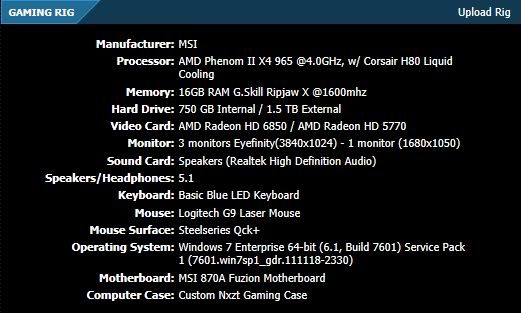
my rig: AMD Black Edition Quad Core 3.7ghz Over Clocked to 4.2ghz / Noctua Nh-D14 Heatsink / G"SKill Ripjaws 8gb / video cards 2 gigabyte 6850's / power supply Thermaltake Toughpower 1000W / mother board ASUS Crosshair V Formula AM3+ AMD 990FX / Full tower Cooler Master HAF 932 -
I run at 100-120 with high/maxed settings on i3, with low settings, I can jump through 140-200.If youre getting a notebook with an i3 or i5 inside, you should be able to play at around 100 fps with the build-in graphics card on maxed out settings. -
-
Check out the deals now,
http://www.techbargains.com/news_displayItem.cfm/291715
http://www.tigerdirect.com/applications/searchtools/item-details.asp?EdpNo=1783479&SRCCODE=GOOGLEBASE&cm_mmc_o=VRqCjC7BBTkwCjCECjCE
My desktop gives me up to 200 fps. it changes. -
You can still play the game, it's just that the resolution is not supported so you will have 2 black bars at the sides.But if you buy a notebook, watch out for the resolution, 1366*768 is not really compatible to crossfire.
I have that resolution i use the max resolution settings and don't get any black bars.
OT: I get around 100-200 Fps no slow downs at all. -
DnB_Gaming wrote: »Your so lucky..At lowest graphics I get around 120 frames per second and at highest I get around 50...I have a desktop. I don't want to upgrade my gfx card though lol.
Yes! I don't recommend upgrading GFX card. I did this once and I had so many errors like screen going blue/black, high spinning sound of the case fan. But maybe it was just for me. 0.0 -
If you upgrade the graphics cards you must also update your power supply/fans. The two go pretty hand and hand naturally as one wants to rise the demands on your comp, one must accept to rise the standards at which to cool it and maintain that equilibrium or balance.Yes! I don't recommend upgrading GFX card. I did this once and I had so many errors like screen going blue/black, high spinning sound of the case fan. But maybe it was just for me. 0.0




Categories
- All Categories
- Z8Games
- Off-Topic - Go To Game OT Forums
- 1 Z8 Forum Discussion & Suggestions
- 16 Z8Games Announcements
- Rules & Conduct
- 5.3K CrossFire
- 992 CrossFire Announcements
- 985 Previous Announcements
- 2 Previous Patch Notes
- 1.4K Community
- 121 Modes
- 611 Suggestions
- 86 Clan Discussion and Recruitment
- 274 CF Competitive Forum
- 19 CFCL
- 26 Looking for a Team?
- 720 CrossFire Support
- 56 Suggestion
- 120 Bugs
- 29 CrossFire Guides
- 169 Technical Issues
- 47 CrossFire Off Topic