How to Run CF on Win 7.

Here's a short guide on how to run CrossFire on windows 7.
First of all:
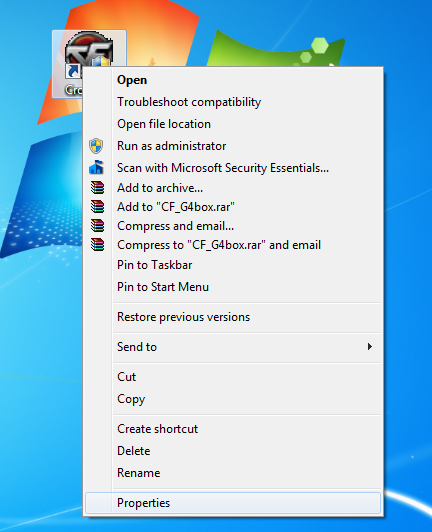
Locate your CrossFire icon on your desktop.
Right Click on it and it Click on Properties.
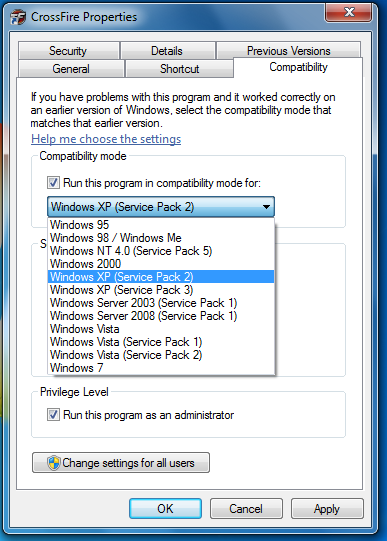
Then Go to Compatibility tab and check "Run this program in compatibility mode for"
and chose Windows XP (Service Pack 2)
NOTE: if it doesn't work then try service pack 3.
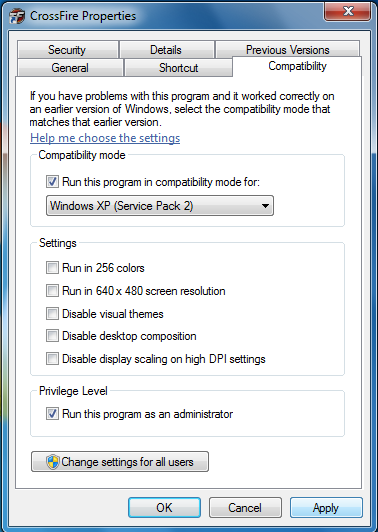
Then check "Run this program as an administrator"
Last but not least click on "Apply" then "OK"
Hope this guide helped.
First of all:
Locate your CrossFire icon on your desktop.
Right Click on it and it Click on Properties.
Then Go to Compatibility tab and check "Run this program in compatibility mode for"
and chose Windows XP (Service Pack 2)
NOTE: if it doesn't work then try service pack 3.
Then check "Run this program as an administrator"
Last but not least click on "Apply" then "OK"
Hope this guide helped.
Comments
-
Assclown321 wrote: »Interesting and simple guide. Varies by computer and user so it isn't really necessary to create a guide about.
- Only use English on these forums.
I should tell you that it Varies from 32bit to 64bit
and it varies in the Game Loading.


Categories
- All Categories
- Z8Games
- Off-Topic - Go To Game OT Forums
- 1 Z8 Forum Discussion & Suggestions
- 16 Z8Games Announcements
- Rules & Conduct
- 5.3K CrossFire
- 1K CrossFire Announcements
- 1K Previous Announcements
- 2 Previous Patch Notes
- 1.4K Community
- 121 Modes
- 618 Suggestions
- 86 Clan Discussion and Recruitment
- 276 CF Competitive Forum
- 19 CFCL
- 26 Looking for a Team?
- 736 CrossFire Support
- 62 Suggestion
- 122 Bugs
- 29 CrossFire Guides
- 173 Technical Issues
- 47 CrossFire Off Topic