Overclocking?

Hi yall :P
I just wonder if anyone of you have overclocked your computer?
Here's a link to my CPU-Z http://valid.canardpc.com/show_oc.php?id=1465537
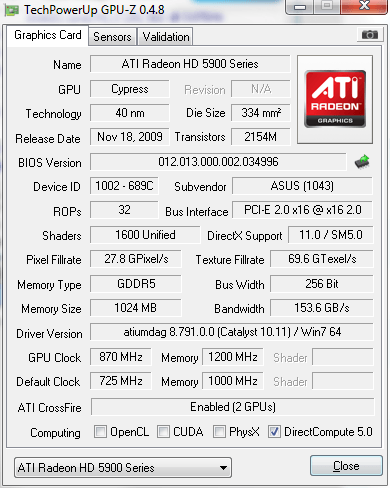
And here is a screenie of the Graphic Card (The verification din't work :S)

The CPU is overclocked from 3.1GHz to 4.0GHz and the GPU from 715/1800MHz to 920/2000MHz.
I improved my FPS by ~40% ( I had ~200 before and now I have ~280)
Do you want me do make a guide on how to overclock? (Just asking :P)
I just wonder if anyone of you have overclocked your computer?
Here's a link to my CPU-Z http://valid.canardpc.com/show_oc.php?id=1465537
And here is a screenie of the Graphic Card (The verification din't work :S)
The CPU is overclocked from 3.1GHz to 4.0GHz and the GPU from 715/1800MHz to 920/2000MHz.
I improved my FPS by ~40% ( I had ~200 before and now I have ~280)
Do you want me do make a guide on how to overclock? (Just asking :P)
Comments
-
-
-
JasonIsSexy wrote: »Why do you think overclocking is bad for your PC? Damn people are so ignorant these days...You're an idiot.JasonIsSexy wrote: »+1
msg2short
Don't me mean, how can he know? He's just a noob ^^ (jk)
DAYUM I want that i7... I'll never buy an AMD again, they overclock to bad, and the GPU's have HORRIBLE drivers...
-
-
-
Not gonna bother with multi-monitor until borderless monitors are invented lol. I can't see the attraction in gaming with fat black lines dividing the picture upMegalo****R wrote: »Have you tried using a doublescreen solution? its not very good, and the Crossfire (Oh, look at that ^^) scaling is aweful! (around 40-50% I think it is...)
And what exactly is GPU scaling? Is it where your graphic card tries to run something at a lower res than your monitor is at? -
JasonIsSexy wrote: »Not gonna bother with multi-monitor until borderless monitors are invented lol. I can't see the attraction in gaming with fat black lines dividing the picture up
And what exactly is GPU scaling? Is it where your graphic card tries to run something at a lower res than your monitor is at?
If you have 2 GPU's in a Crossfire/SLI configuration the ultimate scaling would be double the performance, but because of bad drivers and the way a computer is built you can't get to that maximum. By 50% scaling you mean that if you get 10 FPS with one card, you get 15 with two. nVidia have around 80% scaling with the 4xx-series and AMD had around 50% with the 5*** series. With the 6*** series AMD have drastically improved their scaling to 70%. -
Got it nowMegalo****R wrote: »If you have 2 GPU's in a Crossfire/SLI configuration the ultimate scaling would be double the performance, but because of bad drivers and the way a computer is built you can't get to that maximum. By 50% scaling you mean that if you get 10 FPS with one card, you get 15 with two. nVidia have around 80% scaling with the 4xx-series and AMD had around 50% with the 5*** series. With the 6*** series AMD have drastically improved their scaling to 70%. thanks. But the thing is my card is always running in Crossfire because it's a dual GPU card. I'm not sure if I should get another one and Quadfire them. I checked some benchmarks and Quadfire gives about 50% FPS boost. -
JasonIsSexy wrote: »Got it now thanks. But the thing is my card is always running in Crossfire because it's a dual GPU card. I'm not sure if I should get another one and Quadfire them. I checked some benchmarks and Quadfire gives about 50% FPS boost.
I don't think its necessary if you are playing CF -
-
-
-
Can someone help my overclock my PC? Here's the Info that I could find.
My Processor is: Intel(R) Premium(R) Dual CPU E2200 @ 2.20GHz 2.20GHz
RAM: 2.0 GB
System Type: 32-bit Operating System
Model: Inspirion 518
My FPS is low so I wanna make it higher.. -
-
Can someone help my overclock my PC? Here's the Info that I could find.
My Processor is: Intel(R) Premium(R) Dual CPU E2200 @ 2.20GHz 2.20GHz
RAM: 2.0 GB
System Type: 32-bit Operating System
Model: Inspirion 518
My FPS is low so I wanna make it higher..
Dell does not allow overclocking in their BIOS settings and you can't overclock onboard graphics.Can someone help me overclock my graphics card.. It's a Intel(R) G33 G31 Express Chipset Family. -
JasonIsSexy wrote: »Dell does not allow overclocking in their BIOS settings and you can't overclock onboard graphics.
Psh, finally someone who knows something that doesn't involve keyboard slapping in this community. First day on the forums after quitting and I see it. Things are looking up for this game. -
Haha nice oneSeaDogAHOY wrote: »Psh, finally someone who knows something that doesn't involve keyboard slapping in this community. First day on the forums after quitting and I see it. Things are looking up for this game.
Unfortunately I don't think it will stop all the questions that Google has the answers for




Categories
- All Categories
- Z8Games
- Off-Topic - Go To Game OT Forums
- 1 Z8 Forum Discussion & Suggestions
- 16 Z8Games Announcements
- Rules & Conduct
- 5.4K CrossFire
- 1K CrossFire Announcements
- 1K Previous Announcements
- 2 Previous Patch Notes
- 1.4K Community
- 122 Modes
- 620 Suggestions
- 86 Clan Discussion and Recruitment
- 276 CF Competitive Forum
- 19 CFCL
- 26 Looking for a Team?
- 739 CrossFire Support
- 61 Suggestion
- 124 Bugs
- 29 CrossFire Guides
- 174 Technical Issues
- 47 CrossFire Off Topic